
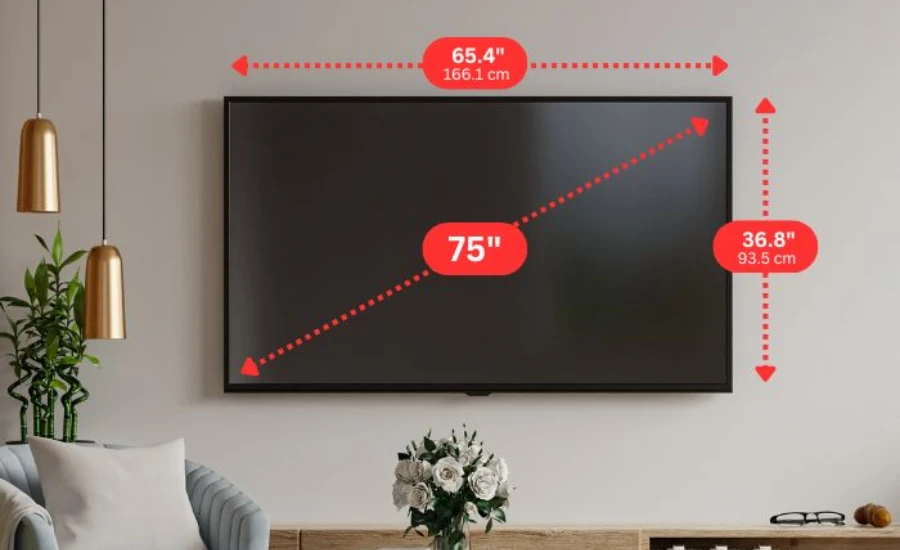
“75 inch” is a diagonal measurement. It is the distance from the bottom-left corner of the screen to the top-right corner. The actual width of a 75-inch TV is approximately 65 inches. The height is approximately 37 inches. Neither of those numbers appears on the box, in most advertisements, or in most product listings. They have to be calculated.
This single misunderstanding — diagonal versus width — is behind most complaints about a TV being larger or smaller than expected after delivery. The 75-inch number is standard and accurate. It is simply measuring something most people are not thinking about when they picture a television on their wall.
Here are the exact numbers and the full set of measurements you need before buying.
The Core Dimensions — Calculated and Confirmed
All standard flat-screen televisions sold in the United States use a 16:9 aspect ratio (widescreen). Given a 75-inch diagonal and a 16:9 ratio, the screen dimensions follow from basic geometry and are consistent across manufacturers:
| Measurement | Inches | Centimetres |
|---|---|---|
| Diagonal (advertised size) | 75.0″ | 190.5 cm |
| Screen width | 65.4″ | 166.1 cm |
| Screen height | 36.8″ | 93.5 cm |
| Screen area | ~2,405 sq in | ~1.55 sq m |
These are screen-only measurements — the actual visible display area. They do not include the bezel (the frame around the screen), the stand, or any other physical housing.
The Full TV Dimensions — What Actually Arrives
The physical TV is larger than the screen dimensions because of the bezel and housing. Bezel thickness has decreased significantly in modern TVs — many 2024–2026 models are nearly “bezel-less” with frames of 10mm or less. This means overall TV width tracks very closely to screen width in current models.
Typical 75-inch TV dimensions including bezel (varies by brand and model):
| Measurement | Typical Range | Example |
|---|---|---|
| Overall width | 66–68 inches (168–173 cm) | Samsung QN75 ≈ 66.1″ |
| Overall height without stand | 38–40 inches (97–102 cm) | LG C4 ≈ 38.1″ |
| Overall height with stand | 42–46 inches (107–117 cm) | Varies significantly by stand design |
| Depth without stand | 1.5–3.5 inches (4–9 cm) | OLED panels thinner than QLED |
| Depth with stand | 12–18 inches (30–46 cm) | Stand foot placement varies |
| Weight without stand | 75–130 lbs (34–59 kg) | OLED typically heavier |
The stand warning most articles do not give: TV stands are not all the same shape. Some TVs have a central pedestal stand (narrow footprint, needs a narrow TV console). Some have two wide-spread legs (requires a console at least 55–60 inches wide to support both legs). Buying a TV stand without confirming which stand configuration your model uses is one of the most common avoidable mistakes in TV setup.
The Math Behind the 65.4 Inches Width
For readers who want to verify or calculate this for any TV size, the formula from the Pythagorean theorem applied to a 16:9 ratio is:
Width = diagonal × (16 ÷ √(16² + 9²)) = diagonal × 0.8717
Height = diagonal × (9 ÷ √(16² + 9²)) = diagonal × 0.4903
For 75 inches:
- Width: 75 × 0.8717 = 65.4 inches
- Height: 75 × 0.4903 = 36.8 inches
This formula works for any screen size with a 16:9 ratio. A 65-inch TV has a screen width of 56.7 inches. An 85-inch TV has a screen width of 74.1 inches. The diagonal-to-width ratio is constant: approximately 0.872 for all 16:9 screens.
Viewing Distance — The Number That Determines Whether the TV Is Too Big for the Room
Viewing distance is where most guides are imprecise. The correct distance depends on both the screen size and the resolution of the content.
For 4K Ultra HD content (the standard for modern TVs):
- Minimum comfortable distance: 5 feet (1.5 m)
- Optimal range: 6.5–10 feet (2–3 m)
- Maximum where 4K detail is visible: 12 feet (3.7 m)
For 1080p HD content (streaming, cable):
- Minimum: 8 feet (2.4 m) — closer produces visible pixel structure
- Optimal range: 9–12 feet (2.7–3.7 m)
The “1.5x the screen size” rule-of-thumb that some articles cite produces approximately 9.4 feet for a 75-inch TV. This is a reasonable starting estimate but is conservative for 4K content and slightly tight for 1080p. The resolution-specific ranges above are more precise.
Room size reality check: A 75-inch TV requires a room where you can sit at least 6.5 feet from the screen for 4K content and 8 feet for standard HD. In a 10×10 foot room, with furniture placement, you will not achieve the minimum recommended distance for HD content. A minimum room depth of 12 feet is commonly cited for a comfortable 75-inch viewing setup.
The TV Stand and Console — Width Requirements
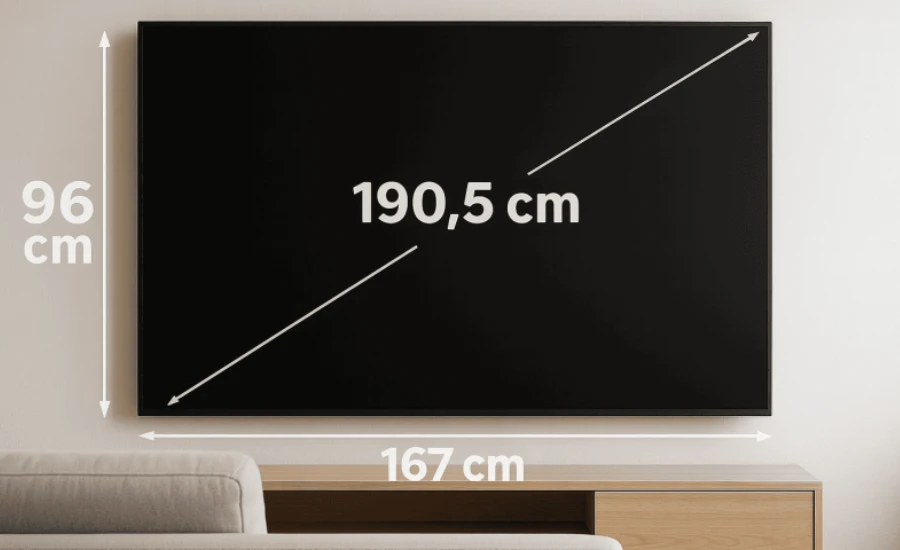
The TV console or stand needs to be wide enough to safely support the TV and ideally provide some visual border on each side. Structural minimums and aesthetic recommendations differ.
Structural minimum: The console must be at least as wide as the TV’s outer dimensions — approximately 66–68 inches for most 75-inch models with wide-leg stands. A console shorter than the TV’s legs will not support the TV safely.
Aesthetic recommendation: Most interior design guidance suggests the console be 2–4 inches wider than the TV on each side, placing it at 70–76 inches for a 75-inch TV.
VESA wall mount pattern: Most 75-inch TVs use a 400×200 mm or 600×400 mm VESA mounting pattern (the bolt spacing for wall mount attachment). Confirm your specific model’s VESA pattern before purchasing a wall mount bracket — mount and TV VESA patterns must match.
The Weight and Wall-Mounting Consideration
Wall mounting a 75-inch TV requires anchoring into wall studs or using a rated toggle anchor system. The typical weight of 75–130 pounds without a stand means the mount must be rated well above the TV’s weight, and stud-anchored mounting is strongly preferred.
Standard US residential wall studs are spaced 16 inches apart. A 600×400 VESA mount pattern spans 600mm (23.6 inches) horizontally — wider than one stud spacing. Most 75-inch TV wall mount installations require either spanning two studs or using a wider mounting rail.
Confirm before mounting:
- TV’s VESA pattern (from the manual or manufacturer spec page)
- TV weight (from the manufacturer spec page — weight varies significantly between models)
- Mount weight rating (must exceed TV weight with margin)
- Stud location (use a stud finder before drilling)
What Varies by Manufacturer — The Numbers That Are Not Standardized
Screen dimensions (65.4 × 36.8 inches) are the same for all 75-inch 16:9 TVs. Everything else varies:
Bezel thickness: Flagship OLED TVs from LG and Sony typically have bezels under 5mm. Budget LCD TVs may have bezels of 15–20mm. This affects overall TV width by up to 1.5 inches.
Stand height and depth: A TV on its stand may be 42 inches tall or 46 inches tall depending on stand design. Stand depth ranges from about 12 inches (central pedestal) to 18+ inches (wide-leg stands). This matters for cabinet and console fit.
Panel depth: OLED panels are approximately 1.7–2.4 inches deep without stand. Mini-LED QLED panels are approximately 2.5–3.5 inches deep. This matters for wall mount clearance and wall proximity aesthetics.
Weight: Can range from 75 lbs (lighter LCD models) to 130+ lbs (larger OLED or premium models). Always confirm weight from the manufacturer spec sheet before wall mounting.
The Measurements You Need Before Buying — Summary
Before ordering:
- Measure your wall width and confirm the TV (66–68 inches wide) fits with visual clearance on both sides
- Measure your viewing distance and confirm it is at least 6.5 feet for 4K, 8 feet for 1080p
- Confirm your TV console is wide enough (minimum 66–68 inches, ideally 70–76 inches)
- Check what stand configuration the specific model uses (central pedestal vs. wide-leg)
Before wall mounting:
- Confirm TV’s VESA pattern (from manufacturer spec)
- Confirm TV weight (from manufacturer spec)
- Purchase a wall mount rated for the TV’s weight at its VESA pattern
- Locate wall studs before drilling
Before setting up:
- With stand: confirm the full height (typically 42–46 inches) positions the screen center at seated eye level (approximately 42–44 inches from floor for most seated adults)
- Without stand (wall mounted): mount the screen center at seated eye level — not as high as possible on the wall
You may also like NFL Minimum Salary
FAQ — 10 Real Questions
1. How wide is a 75-inch TV?
The screen is approximately 65.4 inches (166 cm) wide. The full TV including bezel is typically 66–68 inches (168–173 cm) wide depending on the manufacturer and model.
2. How tall is a 75-inch TV?
Screen height: approximately 36.8 inches (93.5 cm). Full TV height without stand: typically 38–40 inches (97–102 cm). With stand: typically 42–46 inches (107–117 cm).
3. Why does “75 inch” not mean it’s 75 inches wide?
The 75-inch measurement is the diagonal distance across the screen, from bottom-left to top-right corner. This is the industry standard measurement for all TVs and monitors. The actual width is approximately 87% of the diagonal for a 16:9 widescreen TV.
4. How far should you sit from a 75-inch TV?
For 4K content: 6.5–10 feet. For 1080p content: 8–12 feet. The minimum is 5 feet for 4K and 8 feet for HD. A room depth of at least 12 feet is recommended for comfortable 75-inch viewing.
5. What size TV stand do I need for a 75-inch TV?
At minimum, the console must be as wide as the TV’s outer dimensions (approximately 66–68 inches). For visual balance, 70–76 inches is recommended. Before buying the stand, confirm whether your specific TV model uses a central pedestal or wide-leg stand, as this affects both required console width and console depth.
6. What is the VESA mounting pattern for a 75-inch TV?
Most 75-inch TVs use either 400×200 mm or 600×400 mm VESA patterns. This is not standardized — confirm your specific model’s pattern from the manufacturer before purchasing a wall mount. A mount bought for the wrong VESA pattern will not work.
7. How heavy is a 75-inch TV?
Between approximately 75 and 130 pounds without a stand, depending on manufacturer and panel type. OLED panels are typically heavier than LCD. Always confirm the exact weight from the manufacturer spec sheet before wall mounting — wall mounts must be rated well above the TV’s actual weight.
8. What room size do I need for a 75-inch TV?
A minimum of 12 feet of room depth to achieve comfortable viewing distance. A room 12–15 feet wide is recommended to give the TV visual proportion without dominating the entire wall.
9. How deep is a 75-inch TV without a stand?
Modern flat panel TVs are typically 1.5–3.5 inches deep without the stand. OLED panels are the thinnest (around 1.7 inches for flagship models). Mini-LED or standard LCD TVs range from 2.5 to 3.5 inches. With the stand attached, depth ranges from 12–18 inches.
10. What height should the center of the TV screen be from the floor?
For most seated adults, screen center should be approximately 42–44 inches from the floor — roughly aligned with eye level when seated comfortably on a standard sofa. Common mistakes include mounting the TV too high, which requires tilting the head upward during extended viewing and causes neck strain.